 Samin Yasar × Poppy
Discover
Type any channel or topic into Discover Content. Poppy pulls the videos and ranks the outliers, the ones that beat a channel's average many times over.
Find winning video ideas, see why they work, research the channels in your niche, and write better scripts in your voice. One visual AI workspace, the one behind the workflow Samin teaches.
$1 for your first 7 days. Then $399 a year unless you cancel before your trial ends. Cancel from your account in two clicks.
Guessing what to film is how channels stall. Outliers show you which videos broke out of a channel's normal, so you start from evidence.
A script is only as good as the research under it. Put the research and the writing in the same place and the draft gets sharper.
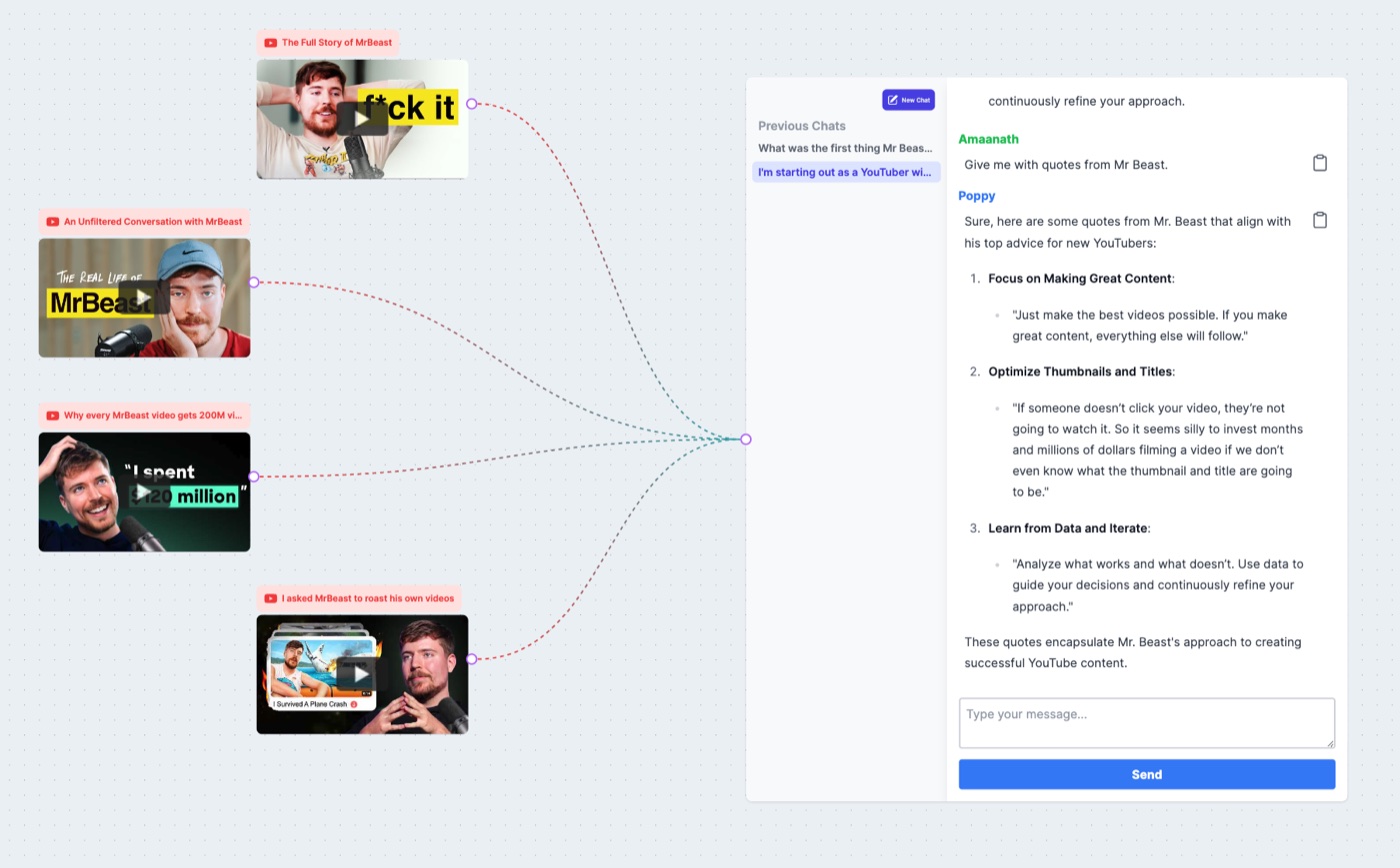
Samin plans his videos on a whiteboard. Poppy is a whiteboard with the AI inside it: everything you drop on the canvas is something the AI can read when it answers.
Secure checkout by Stripe · Apple Pay on iPhone · cancel any time before day 7
Poppy devours YouTube videos, voice notes, images, PDFs and websites, so you can crank out scripts, hooks and titles that make your competition nervous. 🚀🧠💪

Bring in any YouTube video and turn it into a script, a stack of hooks, or a breakdown of why it worked.
Ramble your idea into a voice note on a walk. Poppy turns it into a script that still sounds like you. 🎙️
Drag in thumbnails and screenshots. Poppy reads them and uses them for your titles and thumbnail ideas.
Drop in a course, a report or your own notes and pull the best parts straight into your script. 🚀
Paste a link and Poppy pulls the good stuff off the page, faster than you can say Ctrl+C, Ctrl+V. 💎
Write the final draft right on the board. No more tab-hopping between Google Docs and five AI chats like a caffeinated squirrel. 🐿️
Samin teaches the method. Poppy is where you run the research, the ideas and the writing. Here is exactly which part is whose.
Type any channel or topic into Discover Content. Poppy pulls the videos and ranks the outliers, the ones that beat a channel's average many times over.
Add the winners to your board. Poppy reads the full transcript of every video you add, so "why did this work?" gets an answer grounded in what was actually said.
Ask for an outline built from your research. You decide the angle, the promise and the order. Poppy drafts, you shape it.
Generate titles, hooks and a script from the board, in your voice, using the structures you studied. Treat it as a strong first draft and make it yours.
Draft thumbnail concepts with Create Image, then film, edit and publish with the tools Samin shows. Poppy prepares the video. It does not record or upload it.
7 days for $1 · then $399 a year · cancel any time before day 7
Poppy has an MCP connector. Add it to the AI app you already use, sign in, and that app can read your boards, search Discover and save research, while you stay in the window you like.
 Claude
 ChatGPTClaude CodeCursor
Plain truth: the thinking in that conversation runs on your Claude or ChatGPT plan. Poppy's own chats and image generation still use your Poppy credits. Developer tools such as Claude Code and Cursor connect with a Poppy API key, which needs a plan with API access. MCP needs an active Poppy plan.
No locked features, no setup, no tokens to buy. The same plan every creator starts on, for a week, for a dollar.
Start the research the same day you watch the tutorial.
Secure checkout by Stripe · Apple Pay on iPhone
Do people like it?
Poppy is a visual AI workspace for people who make content. You drop YouTube videos, channels, documents, notes and images onto a canvas, and the AI researches, analyzes and writes with all of it in context: outlier research, video breakdowns, titles, hooks, scripts, mind maps and thumbnail concepts, in your own voice.
Yes. There is no API key, no model to configure and no prompt engineering to learn first. You add a video, open a chat and ask a question. Samin's tutorial walks the whole workflow step by step, and every $1 trial can book a live group onboarding session with the Poppy team.
No. The workflow starts with research, which is the part that matters most before your first upload: find the channels your future audience already watches, see which of their videos broke out, and script your first video from that. An existing channel just gives Poppy more of your own material to work from.
Yes, two ways. Side by side: Claude in one window, Poppy in the other, the way Samin works through the tutorial. Or connected: Poppy has an MCP connector you add to Claude (or ChatGPT) with your Poppy login, so that app can search Discover, read your boards and save research without you switching tabs.
No. Poppy's AI runs inside Poppy on the credits that come with your plan, 2,000 a month on the trial and on the Basic plan. You never buy tokens or set up a key. If you already pay for Claude or ChatGPT, the connector lets you use Poppy from there as well. It is optional, not required.
The full Basic plan for 7 days: Discover Content with Outliers, boards, research chats with full transcripts in context, titles, hooks and scripts, Create Image, the MCP connector and 2,000 AI credits for the month. Nothing is held back for paying customers.
Your subscription continues on the Basic plan at $399 a year ($33 a month, billed annually), the same price as everyone else. The date and the amount are shown on the checkout page before you pay and in your account afterwards.
Yes. Cancel from your account's billing settings any time before your trial ends and the annual charge never happens. Once it is charged, that payment is non-refundable.
That is what it is built for. Discover and Outliers handle the research, the board holds your references with their full transcripts, and the chat writes titles, hooks, outlines and scripts from that material in your voice. Filming, editing and publishing happen in your own tools, which Samin covers in the tutorial.

You watched Samin do it. Open Poppy, run the research on your own niche, and have a script on the board before the week is out.
$1 for your first 7 days, then $399 a year unless you cancel first. Cancel any time.